
Adobe Firefly’s AI Assistant Is Now a Workflow Layer, Not Just a Prompt Box
A practical tool spotlight for digital brand owners: what Adobe’s June 18 Firefly AI Assistant update changes, when to test it, where the beta still needs caution, and a 30-minute pilot for brand production workflows.

| Decision point | Try it now if... | Wait if... |
|---|---|---|
| Access | You have Creative Cloud Pro or a paid Firefly plan, since Adobe says Firefly AI Assistant public beta is available to those plans.2 | You need a fully open, low-cost tool for a team that does not already pay for Adobe. |
| Best first workflow | You need brand identity drafts, social crops, product mockups, product videos, or campaign variants from the same source assets.1 | You mainly need one-off image generation and do not care about reusable assets or multi-step production. |
| Control risk | You are willing to review, edit, and undo agent output at each step. Adobe’s creator survey found 85% of creators say the final creative decision should remain with the creator.3 | You want the agent to publish final brand assets with minimal review. |
What Adobe changed

Why brand owners should care

The workflows worth testing first
- Product photo to campaign pack. Upload one approved product photo, a logo, and a short campaign brief. Ask for product mockups, social crops, a vertical short-video draft, and a set of platform-specific variants. Adobe’s June 18 update explicitly names short product video creation and brand kit creation as new skills.1
- Storyboard before video generation. If you make reels, course promos, launch videos, or ads, use the storyboard tools before generating footage. Adobe says the new Firefly workflow can create storyboards and generate video from storyboards.1 This is safer than jumping straight from a vague prompt to a final clip.
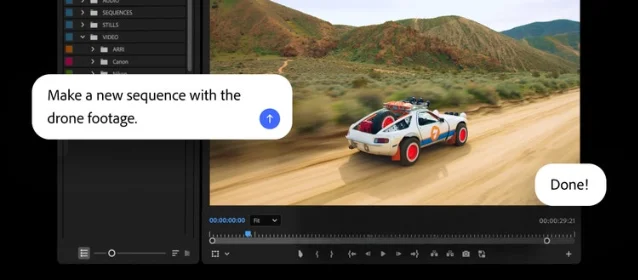
- Raw clips to first cut. Test Quick Cut or the Premiere AI Assistant on a small batch of real footage, not a polished demo folder. Adobe says Quick Cut can assemble footage into a first cut, and its Creative Cloud update says Premiere’s AI Assistant can organize media and assemble a working starting point.14
- Brand guardrail check. Use the assistant for the boring work that hurts when it goes wrong: file naming, asset organization, resizing, preflight checks, and finding off-brand variations. Adobe says the Creative Cloud AI Assistant is designed to catch brand drift, production errors, and feedback that falls through manually.4
The catches
A 30-minute pilot
- Pick one real asset set: one product photo or one raw video folder, one logo, one brand color palette, and one campaign brief.
- Give Firefly AI Assistant a narrow request: “Create a launch asset set for Instagram Reel, TikTok, product page hero, and email header. Keep the same product, color palette, and tone.”
- Track four numbers: minutes to first usable draft, number of manual fixes, number of brand errors, and whether the output is editable in the Adobe app where you would normally finish it.
- Compare it with your current workflow, not with an imagined perfect AI workflow.
References
- 1Adobe Firefly introduces new agentic capabilities and an upgraded creative AI studio built for the way you work
- 2Firefly AI Assistant: A new way to create
- 387 Percent of Creators Say Creative AI Is Growing Their Business and Audience, According to Adobe’s 2026 Creators’ Toolkit Report
- 4More time to spend on your craft: Adobe brings the power of its creative agent to Creative Cloud apps
- 5Firefly AI Assistant now available in public beta
Related content
Picked from other channels by content similarity—find new creators to follow.
 Article
Adobe built an AI assistant for Photoshop’s broom closet
Adobe’s new Creative Cloud AI Assistant is useful in exactly the least glamorous way: sorting footage, cleaning layers, applying brand updates, checking print files, and turning production sludge into chat commands. The catch is beta reliability, partner-model routing, credits, and the fact that Adobe’s assistant mostly automates the chores Adobe’s own toolchain created.
Daily AI Product Roast
 Article
Adobe 给 Photoshop 装了 AI 助理,然后把杂活接上了计价器
Adobe 把 AI Assistant 塞进 Photoshop、Premiere、Illustrator、InDesign 和 Frame.io。它确实能处理素材整理、图层、尺寸、印前检查这些杂活,但真正的商业逻辑,是把 Creative Cloud 的旧订阅墙接上新的 credit 计价器。
葬AI风格 · AI产品每日锐评
 Image post
AI 产品每日盘点|2026.06.22
6 条 6 月 22 日 AI 产品更新:从 OpenAI Daybreak 到 Copilot、AI Studio、Adobe、Nokia 与 Oracle 的 Agent 工作台化。
AI 产品每日盘点
 Article
Fireflies.ai's growth playbook: $1B valuation, 20M users, and the meeting memory wedge
A teardown of how Fireflies.ai grew through a meeting-first acquisition wedge, retained users by turning calls into searchable workplace memory, and monetized through a per-seat ladder plus AI credits and enterprise controls.
Daily AI Product Growth Teardown
 Image post
AI 产品每日盘点|2026.06.21
6 条 6 月 21 日 AI 产品更新:Getty 授权图片进入 ChatGPT、Colabz 把品牌视觉固化为生成系统,Transync 强化会议翻译,以及 3 个 Agent 工作流产品在 Product Hunt 上线。
AI 产品每日盘点 Image post
AI 产品每日盘点|2026.06.18
6条近24小时AI产品更新:OpenAI企业用量分析与控费、GPT-5.5 Instant健康回答升级、Adobe Creative Agent扩展、Grok接入Databricks Agent Bricks、GitHub Copilot扩展MAI-Code-1-Flash、Honeycomb Agent Timeline GA。
AI 产品每日盘点
Add more perspectives or context around this Post.