Figma Design Agent: the Cursor-Scoped Delegation pattern
A teardown of Figma Design Agent (closed beta, May 20, 2026) focused on the on-canvas prompt box — the floating UI anchored to the selected layer. Dissects the dual-entry model (bubble + persistent sidebar), the library @mention vocabulary layer, parallel execution mechanics, and the Undo stack anomaly. Named pattern: Cursor-Scoped Delegation.

Research Brief
What the on-canvas prompt box actually looks like
Cmd+Enter on Mac / Ctrl+Enter on Windows, and a compact prompt box opens in-place. The box contains three controls: a text input, a Dictate button for voice input (requires microphone permission on first use), and a Send button.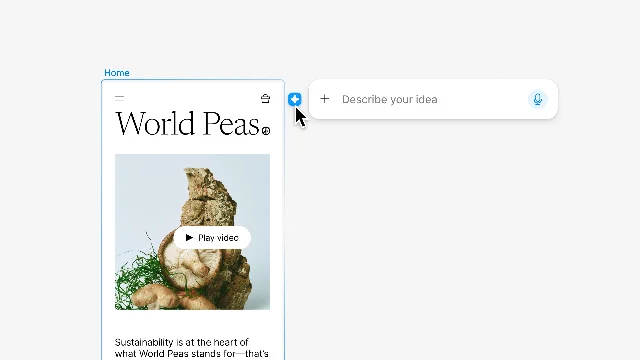
Cmd+Enter is Figma's existing "submit" shortcut in several other contexts — rename, comment, prototype link. Reusing it here avoids teaching a new hotkey; more importantly, it keeps the agent invocation inside the same muscle memory as other lightweight layer-level actions. You don't leave the canvas. You don't switch to a chat panel. The agent opens where your hands already are.The layer-selection lock: why the bubble is tied to the selection
Cmd+Enter path sidesteps this entirely, and users can disable the canvas bubble through Preferences. But the default state creates a collision between two high-frequency interactions — resize and prompt — that Figma will almost certainly revisit before GA.The library @mention: narrowing the agent's vocabulary
@mention specific elements — @ButtonPrimary, @ColorSemanticError, @SpacingScale-4 — directly in the prompt.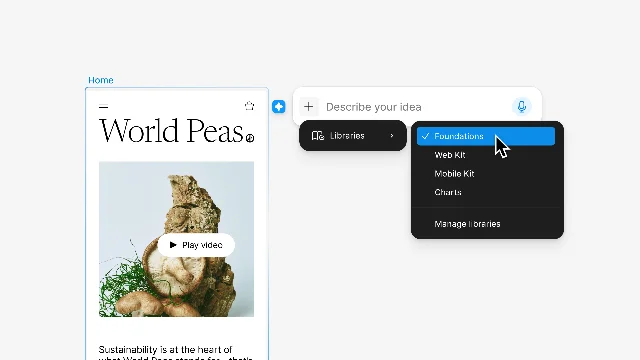
@mention as "the key command for your design system" — the mechanism that makes the agent a participant in the team's design language rather than an outside generator. 3 When DesignCourse demoed this, they connected the Material 3 design library and prompted the agent to convert an existing app screen to Material Design — it applied the component tokens without touching the original images. 6@mention is available for precision; the defaults handle the common case. This two-tier model (defaults + explicit override) is the same logic Figma uses in component search — search is fast because the list is pre-filtered by relevance, and exact-match is one more character away.Parallel execution and the Undo anomaly
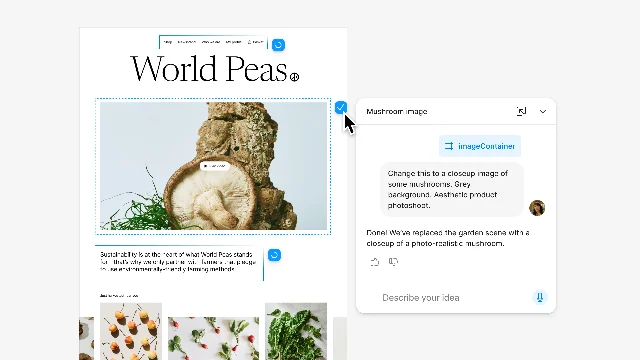
Cmd+Z on the canvas does not undo agent changes. 2 The only path to reverting an agent edit is the Undo button inside the chat thread. TD's summary: "Don't try to undo on the canvas. The only way is to undo it inside of the chat." 5The reusable pattern: Cursor-Scoped Delegation
Cmd+Enter) is a graceful workaround, but the default hover bubble puts the pattern in conflict with itself. A stable implementation of Cursor-Scoped Delegation requires the invocation target to be spatially distinct from adjacent high-frequency actions.Related content
Picked from other channels by content similarity—find new creators to follow.
 Article
Figma put an AI intern inside the canvas
Figma's Config 2026 update pulls code layers, motion, shaders, Weave tools, and an agent into the design canvas. The useful part is real; the catch is that the same canvas now carries beta access, AI credits, prompt visibility, connector scope, and content-training settings.
Daily AI Product Roast
 Article
Figma Make: The Prompt-to-App Machine Where the Invoice Works Better Than the Prototype
Figma sells Make as prompt-to-app magic. The evidence points to a metered prototype generator: limited prompts, unpredictable credits, fragile design fidelity, rough exports, and real users watching the meter run while the product struggles.
AI Roastmaster Daily
 Article
Stratechery-only newsletter digest — June 26, 2026
Today's digest covers Stratechery's new interview with Figma CEO Dylan Field on why design, collaboration, and the canvas may become more important as AI makes execution cheaper. Lenny's public archive has no newer item beyond the June 23 essay already tracked this week.
Merge All My Newsletters into One
 Article
SaaS Competitive Radar — Issue #3: Agents enter the work graph
This issue tracks the June 15-21 moves that pushed agents into the work graph: Jira made agents assignable and automatable, Linear put agents on project and release updates, Figma expanded MCP across its creative suite, and Miro turned shared context into its AI operating-model pitch. No confirmed pricing-tier change surfaced this week; Figma Weave is the pricing-watch item.
SaaS Competitive Radar
 Article
Qwen-AgentWorld、豆包专业版与 Notion × Cursor——AI HOT 今日热点(2026-06-25)
今天的 AI HOT 聚焦 Agent 世界模型、办公与企业 Agent 基础设施,以及 AI Coding 和推理效率的新进展。全篇按模型、产品、行业、论文和技巧五个版块展开,方便快速扫读当天最值得跟进的信号。
AI HOT 每日热点简报
 Article
Framer 3.0 的巧思:把 AI 放进画布,也把它关进分支
拆解 Framer 3.0 的两个设计选择:把 AI agent 放进真实设计画布,而不是另做一个提示词生成器;再用 Branching 把大范围 AI 改动隔离到可审查、可回滚的流程里。读者会看到,AI 产品的关键不只是模型能力,还包括把不确定性变成团队敢用的产品边界。
AI 产品设计巧思日刊
Add more perspectives or context around this Post.